SourceWrap

Tint Tara

Tint Tara is a Laravel beauty store with guest checkout, WhatsApp ordering, and an admin dashboard.

Description

Tint Tara 1.0.1 | Beauty Storefront with Guest Checkout

Tint Tara | Beauty Storefront with Guest Checkout

A self-hosted Laravel shop for beauty brands selling lip colours, makeup and skincare. Organise a catalogue, present shades and ingredients, and manage delivery orders from your own admin panel.

VERSION 1.0.1 LARAVEL 13 PHP 8.4+ MYSQL GUEST CHECKOUT

Store workflows

Show shoppers the details they need

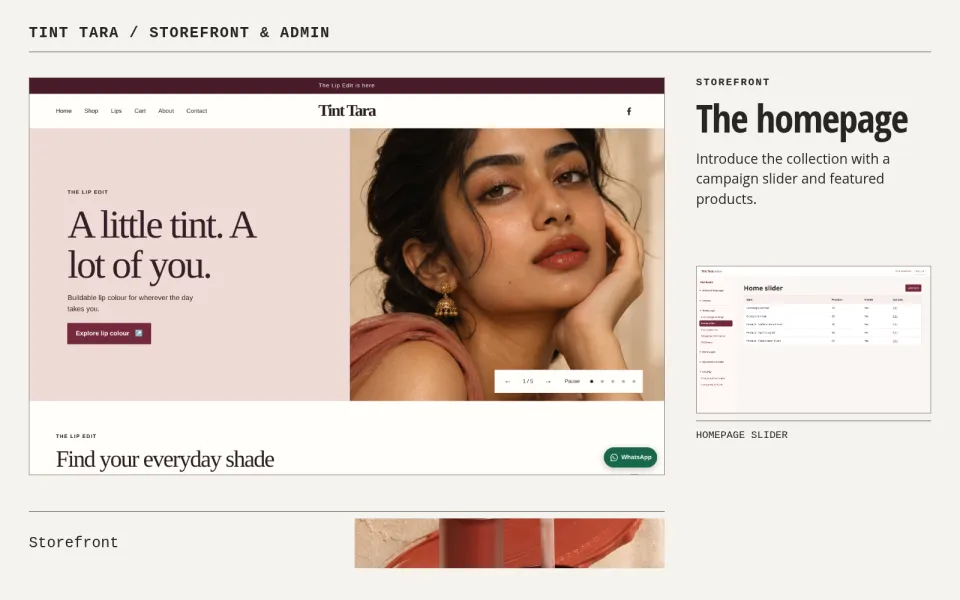
Use collections, multiple product photos and dedicated fields for shade, finish, ingredients and how to use the product. Shoppers can search the catalogue and filter by category or sale status.

Take delivery orders without customer sign-up

Customers can buy from a product page or check out with several items in the cart. Checkout collects their phone number, delivery address and an optional nearby landmark.

Update your storefront from the admin panel

Change your logo, colours, navigation and announcements. Edit homepage campaign slides, promotional sections, featured products and page copy as your collections change.

Follow up on orders and enquiries

See recent orders and date-filtered order counts from the dashboard. Open an order to view its reference, items and delivery details, update its status, and manage contact messages from a separate inbox.

How the store works

Publish a collection

Create a category and assign products to it. Upload up to six photos per product, add alternative text, set a regular or sale price and choose which items to publish or feature on the home page.

Accept orders and offer WhatsApp follow-up

The checkout records a delivery order and generates an order reference. Enter your business WhatsApp number to offer a chat button and an optional order handoff. When the shopper chooses WhatsApp, the store saves the order before opening a prefilled message. The shopper sends that message in WhatsApp.

Manage the catalogue and customer-facing content

Use the admin panel to edit product reviews, menus, social links and site policies. Add a default social-sharing image and edit SEO titles and descriptions where available. The store serves a sitemap and robots.txt.

Frequently asked questions

Do shoppers need an account?

Customers browse and place orders through guest checkout. Administrators have a separate sign-in with an authenticator app and recovery codes.

Which payments does this release support?

Tint Tara records pay-on-delivery orders. Online card payments and payment gateways are outside the scope of this release.

Does the package come with products?

A fresh installation starts with an empty product catalogue and starter navigation and homepage content. Add your own categories, products, prices and store information through the admin panel.

How do installation and activation work?

Open the web installer and enter the empty database credentials, your SourceWrap activation key and your first administrator details. After verifying the key, the installer creates the database tables and the administrator, then opens the admin sign-in.

Tint Tara Feature Directory

Explore the storefront, guest ordering, admin controls and tools included in release 1.0.1.

Storefront and catalogue

Responsive beauty storefrontINCLUDED
Search by product name, shade or description and filter by category or saleINCLUDED
Category pages and paginated product listingsINCLUDED
Product pages with up to six photos and image alternative textINCLUDED
Shade, finish, ingredients and usage fieldsINCLUDED
Regular and sale pricing and configurable store currencyINCLUDED
Category and product publishing, order and featured controlsINCLUDED
Administrator-managed product reviews and ratingsINCLUDED

Orders and customer enquiries

Quick add from listings and add to cart from product pagesINCLUDED
Cart quantity updates and item removalINCLUDED
Single-product and multiple-item guest checkoutINCLUDED
Delivery address, phone and optional landmarkINCLUDED
Order reference and session-protected confirmationINCLUDED
Pay-on-delivery orderingINCLUDED
Configurable WhatsApp chat button and order handoffOPTIONAL
Contact form and admin inbox with read and delete controlsINCLUDED
Date-filtered order dashboard and recent ordersINCLUDED
Order details and manual status updatesINCLUDED

Appearance and content

Brand name, logo, favicon, colours and font choicesINCLUDED
Editable header, announcement bar and navigationINCLUDED
Editable home slider, featured products and promotional sectionsINCLUDED
Homepage shopping information and FAQ itemsINCLUDED
Editable About, Policies and Contact pagesINCLUDED
Editable shop, category, product, cart and checkout page settingsINCLUDED
Editable confirmation, review and error-page settingsINCLUDED
Footer content, footer navigation and social iconsINCLUDED
Default and per-page SEO settings where availableINCLUDED
XML sitemap and robots.txtINCLUDED
Installation and security

Web installer with database setup and first administrator creationINCLUDED
SourceWrap activation with a locally stored signed receiptINCLUDED
Scheduled licensing sync and admin Activation MessagesINCLUDED
Administrator sign-in with Google Authenticator and recovery codesINCLUDED
Optional Google reCAPTCHA settings for supported storefront and admin formsOPTIONAL
Form CSRF protection and rate limits on selected actionsINCLUDED

Tint Tara Hosting Requirements

Use PHP 8.4.1 or later, an empty supported database and HTTPS for production. Configure the web PHP version and the PHP CLI used by cron.

Essential hosting requirements

PHP and LaravelREQUIRED

PHP 8.4.1 or later

The package includes Laravel 13.42.0, Composer dependencies and built storefront assets. Use a supported PHP version for both browser requests and scheduled commands.

DatabaseREQUIRED

MySQL 8.0.16+ or MariaDB 10.4+

Create an empty utf8mb4 database and assign a user that can create or alter tables and indexes, create foreign keys and read and write records. Use the database host and port supplied by your provider.

Web serverREQUIRED

Apache 2.4 deployment with rewrite rules

Point the site at the directory containing index.php, install.php and the core folder. Allow the supplied .htaccess rules, enable mod_rewrite and enable mod_headers for the supplied response headers.

HTTPS and SourceWrapREQUIRED

Valid TLS certificate and outbound HTTPS

Use HTTPS for the production installer. The server needs outbound HTTPS access to activation.sourcewrap.com for activation and licensing sync. Have your SourceWrap purchase key ready.

PHP extensions and write access

Enable ctype, curl, dom, fileinfo, filter, hash, iconv, json, libxml, mbstring, openssl, pcre, pdo_mysql, session, sodium and tokenizer.

The installer needs write access to core during first setup. The web and scheduled PHP processes need write access to core/storage and core/bootstrap/cache.

First installation

  1. Extract the buyer ZIP into the site’s document root, including dotfiles. Open https://shop.example.com/install.php on your actual domain.
  2. Enter your database credentials, SourceWrap key and first administrator details. The installer verifies the key, sets up the empty database and opens /admin/login.
  3. Sign in, enrol Google Authenticator and save your recovery codes. Then create your catalogue and set up scheduled licensing sync.

On Hostinger, if the installer reports PHP 8.3, see BUYER-INSTALL.md in the package for the PHP 8.4 handler. Hostinger’s PHP version guide

Hostinger cron job setup

After activation, Laravel schedules sourcewrap:activation-sync every minute. In hPanel, open Cron Jobs, choose Custom and set the schedule to every minute (* * * * *). Paste only this command into Command to Run after replacing the sample project path.

/opt/alt/php84/usr/bin/php /absolute/path/to/project/core/artisan schedule:run -v

In SSH, confirm the CLI version with /opt/alt/php84/usr/bin/php -v. Use the absolute path to a compatible PHP binary if your plan uses a different one. From the directory containing artisan, run pwd -P and ls -l artisan to check the project path. Verify that the licensing job is listed with this command.

/opt/alt/php84/usr/bin/php /absolute/path/to/project/core/artisan schedule:list

After the saved job has run, check View Output in hPanel. Hostinger’s cron setup guide · Hostinger’s cron output guide

Optional services

WhatsApp

Add your business number with country code to enable the available chat and order handoff options.

Google reCAPTCHA

Provide your own Google reCAPTCHA keys to enable protection on selected storefront and admin forms.

Release 1.0.1 passed fresh-install tests on PHP 8.4.24 with MariaDB 10.11.18 and MySQL 8.4.13. The activation and scheduler tests used a signed test service.

Reviews

No reviews yet.